
Healthcare Website Design: Patient Tasks and the Notices Your Site Must Carry
·

Good healthcare website design starts with what patients come to do. They want to find the right location or clinician, book, understand what they will pay, and get into their records. For a hospital, clinic group or specialty practice, particularly one paid by Medicare or Medicaid, the site may also have to carry content that federal rules require, and some of it has to sit on the homepage. Three top-ranking design guides we read in full cover the first half and say little about the second.
- Build location and clinician pages as the core templates, and give the patient portal one obvious entry point.
- Section 1557 recipients must post a nondiscrimination notice and a language-assistance notice “at a conspicuous location” on their website.
- Hospitals, surgical centers, freestanding emergency departments, and providers who furnish care at them, must put their balance-billing disclosure, or a link to it, on a searchable homepage.
- Under HHS’s rule as extended in May 2026, recipients of its financial assistance with 15 or more employees face the WCAG 2.1 AA accessibility standard from May 11, 2027, though HHS has said it may propose changes.
This is for the CEO, CMO or practice leader planning a rebuild. The design advice is our judgment as a design studio; each rule cites its regulation, checked in November 2026. Nothing here is legal advice. Your compliance officer and counsel should confirm what applies to your organization.
Healthcare website design around patient tasks
Write down the tasks before anyone sketches a homepage. People arrive at a healthcare site to get something specific done, and some of them are sick or worried while they do it. A typical list:
- Find care. Which location is near me, and who treats this condition? Are they taking new patients?
- Book. Request an appointment online, or find the number if they would rather talk to someone.
- Check cost and coverage. Do they take my insurance, and what will I owe?
- Reach their records. Sign in to the portal, pay a bill or download a form.
- Know what to do now. After-hours numbers and the choice between urgent care and the emergency department, with a plain line telling people to call 911 in an emergency.
Rank them for your organization, starting from call-center logs and site-search terms. The top two tasks belong in the header and on the first screen of the homepage, and the rest can sit one click down.
Healthcare UX design also depends on the words patients use. A service line called “Interventional Cardiology” can keep its name on the page, but the menu and site search should also answer “heart doctor” and “chest pain.” Test the navigation with front-desk staff before the visual design starts; they hear the same questions often.
Location and clinician pages carry the site
On a medical clinic website, the pages that do the work are the location page and the clinician profile. Design those two templates first, then build the homepage to route people into them.
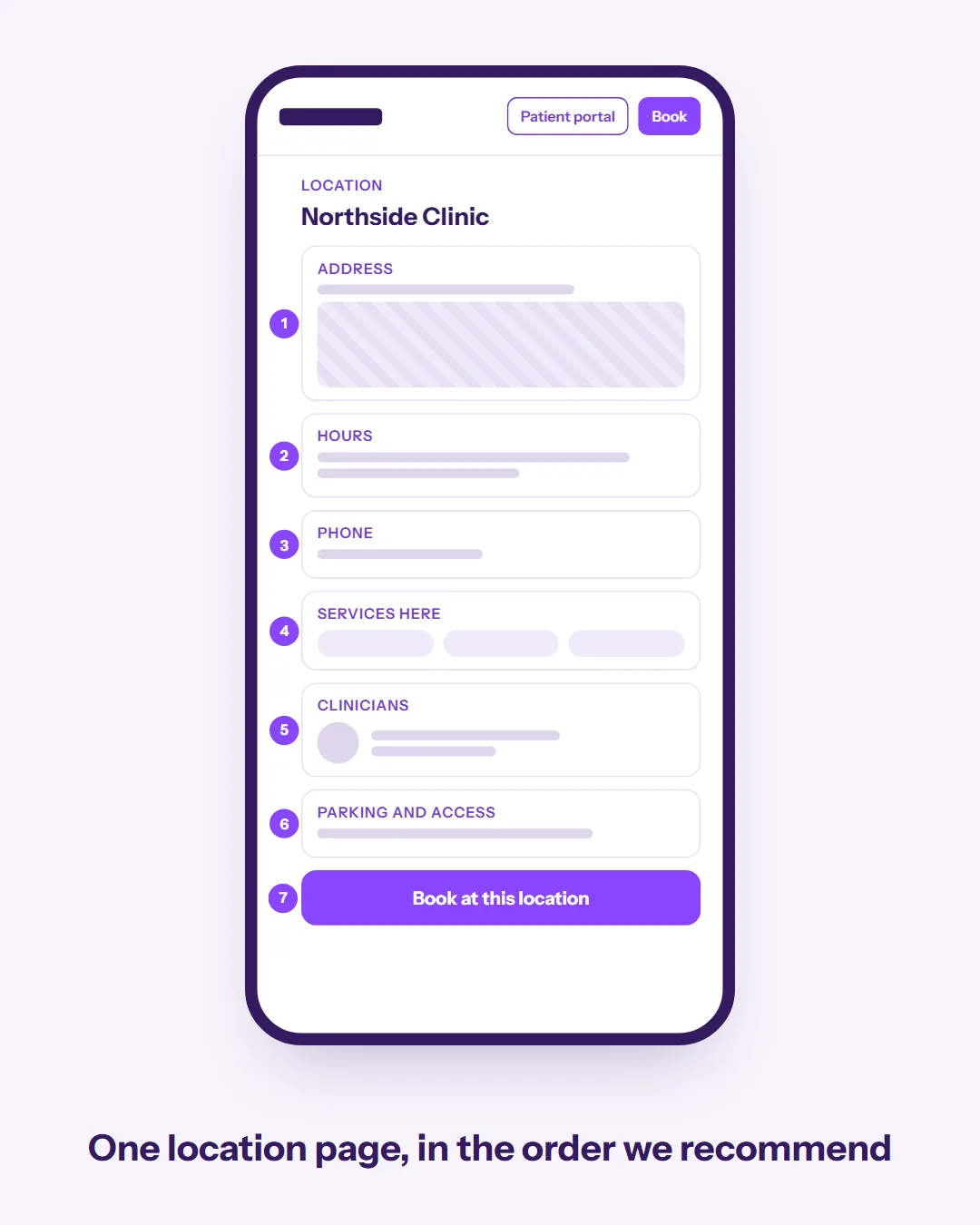
A location page should answer, in this order: address with a map link, hours, phone, services offered, clinicians who practice there, parking and accessibility details, and how to book. Use one template for every location, and check it on a phone, since Google’s mobile-first indexing guidance asks that your mobile site contain “the same content as your desktop site.” Google’s structured data documentation says to “Define each local business location as a LocalBusiness type,” so mark up each location page with its own structured data.
A clinician page needs a real photograph, specialties, the locations and days they see patients, languages spoken, whether they are accepting new patients, and their training. When a clinician leaves the practice, take the page down that week and redirect it to the specialty page or a related page.
If your group runs several brands, decide how they relate before designing navigation; our guide to brand architecture covers that choice.
Treat the portal as part of the site
A portal may come from your EHR vendor, but it is part of the patient’s experience of your group. The Office of the Assistant Secretary for Technology Policy (ASTP/ONC) analyzed the 2024 Health Information National Trends Survey, a national survey of 7,278 adults with a 27.31% response rate. Nationally, 65% of individuals were offered online access to their medical records by a provider or insurer and used it at least once in the past year, up from 25% in 2014.
Among people offered access, 87% of those encouraged by their provider accessed the portal at least once in the past year, against 57% of those who were not encouraged. That is an association and may reflect patients who were already engaged. It still supports inviting patients to the portal at booking and in appointment confirmations. The same brief found that 59% of individuals had more than one online medical record or patient portal.
A patient with several portal logins from past providers may not know which one is yours. Give the portal one clearly labeled link in the header (“Patient portal” is likely clearer to patients than a vendor product name), and a short sign-up page.
Notices the rules put on your website
Three federal rules, plus HIPAA’s privacy notice, require specific content on a healthcare website. Which ones reach you depends on your organization type and how you are paid.
Who needs what
| Rule | Who it reaches | What the site needs |
|---|---|---|
| Section 1557 (45 CFR 92.10, 92.11) | Recipients of HHS financial assistance, including Medicaid and Medicare Part B | Nondiscrimination notice and language-assistance notice at a conspicuous location; the language-assistance notice in English plus the 15 most common languages of the state or states you operate in |
| No Surprises Act (45 CFR 149.430) | Hospitals, hospital outpatient departments, critical access hospitals, ambulatory surgical centers, freestanding emergency departments, and providers furnishing care at them | Balance-billing disclosure, or a link to it, on a searchable homepage |
| Hospital price transparency (45 CFR part 180) | Hospitals | Root .txt file, “Price Transparency” footer link, shoppable services display or estimator |
| HIPAA Privacy Rule (45 CFR 164.520) | Covered entities whose website provides information about their customer services or benefits | Notice of Privacy Practices posted prominently and available electronically through the site (see our HIPAA guide) |
Section 1557 nondiscrimination and language assistance notices
Section 1557 of the Affordable Care Act applies to the health programs and activities of organizations that receive federal financial assistance from HHS. HHS’s 2016 rule already counted physicians paid through Medicaid. In its 2024 rule HHS changed its position on Medicare Part B, stating that “the requirements of section 1557 and other civil rights statutes apply to entities that receive payments through Medicare Part B.” A practice that receives Part B payments is in scope, and Part-B-only practices had until May 6, 2025 to comply.
The notice of nondiscrimination (45 CFR 92.10) and the notice of availability of language assistance services (45 CFR 92.11) must each be posted “At a conspicuous location on the covered entity’s health program or activity website, if it has one.” The language notice has to be in English “and at least the 15 languages most commonly spoken by individuals with limited English proficiency of the relevant State or States in which a covered entity operates.” The nondiscrimination notice was due in November 2024 and the language notice in July 2025.
One way to handle the notices is a footer link labeled “Nondiscrimination and language assistance” on every page, leading to a page with both notices and the translated versions of the language assistance notice.
A federal court in October 2025 vacated part of the 1557 rule as it relates to gender identity, including part of the notice content in 92.10. HHS has said “The other provisions of the Section 1557 Rule remain in force,” and the website posting duty is among them. Counsel should decide whether the footer link counts as conspicuous for your site and check your notice wording against the court’s change.
No Surprises Act balance-billing disclosure
This rule reaches health care facilities and the providers who furnish care at them. For non-emergency services, the regulation defines a facility as a hospital, hospital outpatient department, critical access hospital or ambulatory surgical center. Independent freestanding emergency departments are covered too. Under 45 CFR 149.430, the disclosure of patients’ protections against surprise balance billing, “or a link to such information, must appear on a searchable homepage of the provider’s or facility’s website.”
A provider with no website of its own has no website duty, and a provider who never furnishes items or services at a facility, or in connection with a visit to one, is exempt. CMS guidance gives the example of a gastroenterologist who works at a facility and says that physician “is required to share disclosure information on their public website.” CMS publishes a model notice you can adapt.
Hospital price transparency
This one applies only to hospitals. Under 45 CFR 180.50, since January 1, 2024 a hospital’s site must keep a .txt file in its root folder pointing to its machine-readable charge file. It must also carry “A link in the footer on its website, including but not limited to the homepage, that is labeled ‘Price Transparency'” leading to the page that hosts the file. The hospital must show shoppable services in a consumer-friendly display or offer a price estimator.
A redesign that drops the footer link or the root file breaks a requirement that already applied, so put both on the launch checklist.
Accessibility deadlines for WCAG 2.1 AA
HHS’s Section 504 (Rehabilitation Act) rule, 45 CFR 84.84, requires recipients of HHS financial assistance to make web content and mobile apps meet the Web Content Accessibility Guidelines (WCAG) 2.1 Level A and AA, unless they can show that doing so would fundamentally alter a program or impose undue financial and administrative burdens. An interim final rule published May 11, 2026 moved the deadlines back a year. Recipients with 15 or more employees must comply beginning May 11, 2027, and smaller recipients beginning May 10, 2028.
In that same rule HHS said it may propose changes to the substance of the web requirements. If it does not, and nothing else suggests a further delay, it “fully anticipates implementing the regulation at the new deadline.”
The rule covers content a recipient provides “directly or through contractual, licensing, or other arrangements.” Your scheduling widget, bill-pay page and portal are in scope even when a vendor built them. Ask each vendor for a current accessibility conformance report before you renew.
There are exceptions, including archived content that meets the rule’s narrow definition and individualized password-protected documents. Intake forms and booking pages that patients use now are not among them. Section 1557’s accessibility section (92.204) adds a general equal-access duty for technology and, for websites and apps, points back to Section 504. It names no technical standard.
A separate law applies, including to providers that receive no HHS funding. The ADA lists the “professional office of a health care provider, hospital” among public accommodations. The Department of Justice says the ADA applies to what those businesses offer on the web, and that they “can currently choose how they will ensure” online accessibility. DOJ names WCAG as helpful guidance and does not mandate a version.
Building to WCAG 2.1 AA targets the standard in the HHS rule and follows the guidance DOJ points to for the ADA. Our accessibility guide covers which WCAG version to target and what to build into the design system.
Forms, scripts and HIPAA
Some mistakes on healthcare sites happen out of sight, such as an unreviewed ad pixel on a booking page. We cover forms, tracking technologies, analytics, business associate agreements and the Notice of Privacy Practices in our guide to a HIPAA compliant website. Decide in the design phase which templates may load marketing scripts.
Health content and search
Google’s guidelines for its search quality raters treat health as a “Your Money or Your Life” topic, and say “Medical search results should be high quality, authoritative, and trustworthy.” Google’s own guidance for site owners says its systems “give even more weight to content that aligns with strong E-E-A-T” on these topics, and asks authors to think about “Who, How, and Why” behind each page.
On a healthcare site, condition and treatment pages should say who wrote or reviewed them, link that name to the clinician’s profile, and show when the page was last reviewed. We found no Google rule that requires a “medically reviewed by” label. A reader or rater should still be able to see that a qualified person stands behind the page.
A rebuild can put search traffic at risk because location and clinician URLs change. Map every old URL to its new page before launch; our guide to redesigning without losing search traffic covers the inventory and redirect map, and the website migration SEO checklist covers domain changes after a merger. If patients ask AI assistants which clinic to go to, clear location facts and clinician pages may help there.
Scoping the rebuild
A healthcare site touches clinical operations, billing and compliance, so write the brief with people from each in the room. Before you talk to agencies, gather:
- Every location, its services, hours and clinicians, and who keeps each one current.
- Your entity type and funding (hospital or not, Medicaid or Medicare billing, employee count), because these settle which rules above apply.
- The states you operate in, so the translated language-assistance notices can be prepared.
- Every third-party tool on the site (scheduling, portal, bill pay, chat, forms) with its owner and whether its vendor signs a business associate agreement.
Agree on the core templates (home, location, clinician, service line, condition page) and design those before secondary pages.
A checklist before launch
- The top two patient tasks are in the header and on the first screen of the homepage.
- Every location page and clinician profile uses the same template and is current.
- The portal has one clearly labeled entry point.
- If you receive HHS financial assistance, both Section 1557 notices are posted at a conspicuous location, with the language notice translated for each state you serve.
- If you are a facility or furnish care at one, the No Surprises Act disclosure, or a link to it, is on the homepage.
- If you are a hospital, the “Price Transparency” footer link and root .txt file survived the rebuild.
- The Notice of Privacy Practices is posted prominently.
- Forms, booking pages and vendor tools have been tested against WCAG 2.1 AA.
- Advertising scripts do not load on booking, form or portal pages unless compliance has approved them.
- Every old URL redirects to its new page.
If you are planning a rebuild, you can book a call with our design team. Our free AI visibility snapshot also shows whether AI assistants name your group when patients ask where to go.
Sources
- 45 CFR part 92 (Section 1557), sections 92.1, 92.4, 92.10, 92.11, 92.204, eCFR, current. Supports the notice posting duty, the 15-language requirement, the compliance dates and the accessibility section.
- Nondiscrimination in Health Programs and Activities, final rule, HHS Office for Civil Rights, Federal Register, 2016. Supports physicians paid through Medicaid as recipients.
- Nondiscrimination in Health Programs and Activities, final rule, HHS Office for Civil Rights, Federal Register, 2024. Supports the Medicare Part B interpretation and the May 6, 2025 date.
- Notice of court vacatur of certain Section 1557 provisions, HHS and CMS, Federal Register, 2026. Supports the scope of the October 2025 vacatur and that other provisions remain in force.
- 45 CFR part 149, sections 149.30 and 149.430, eCFR, current. Supports the health care facility definition, the homepage disclosure and the exceptions.
- No Surprises Act disclosure training, CMS. Supports the gastroenterologist example.
- Model disclosure notice on surprise billing protections, CMS, 2023. Supports the availability of a model notice.
- 45 CFR part 180 (hospital price transparency), sections 180.50 and 180.60, eCFR, current. Supports the .txt file, footer link and shoppable services requirements.
- 45 CFR 164.520, eCFR, current. Supports the Notice of Privacy Practices website posting duty.
- 45 CFR part 84 (Section 504), sections 84.10, 84.84 and 84.85, eCFR, current. Supports the WCAG 2.1 AA standard, the defenses, the dates, vendor coverage and the exceptions.
- Section 504 compliance date extension, interim final rule, HHS Office for Civil Rights, Federal Register, 2026. Supports the moved deadlines and the possible future rulemaking.
- 42 U.S.C. 12181, US Code, 2023 edition. Supports health care provider offices and hospitals as public accommodations.
- Guidance on Web Accessibility and the ADA, US Department of Justice, 2022. Supports the ADA’s application to websites and the flexibility on standards.
- Individuals’ Access and Use of Patient Portals and Smartphone Health Apps, 2024 (Data Brief No. 77), ASTP/ONC, 2025. Supports the portal access, encouragement and multiple-portal figures and the survey method.
- Search Quality Rater Guidelines, Google, 2025. Supports health as a YMYL topic and the standard for medical results.
- Creating helpful, reliable, people-first content, Google Search Central, 2026. Supports the extra weight on E-E-A-T for YMYL topics and the “Who, How, and Why” guidance.
- Mobile site and mobile-first indexing best practices, Google Search Central, 2025. Supports the same-content guidance for mobile templates.
- Local business (LocalBusiness) structured data, Google Search Central, 2026. Supports marking up each location.
Want more of our writing in your Google results? Add Innovara as a preferred source.